Get Paid To Promote, Get Paid To Popup, Get Paid Display Banner

Email Subscriptions

Showing posts with label windows. Show all posts

Staying Connected While on the Road

     It's a few days until I take a trip to Albuquerque, New Mexico. I'll be there about three days, and have been thinking about how to stay connected. For my work, all I really need is a web browser, but some need powerful desktop machines that can do HD video editing or 3D rendering. You can't really bring a 10 pound desktop computer with you on the trip, so how do you stay connected without lugging around a giant PC?  
     There are some great, free tools to help. I use a great free remote access program called TeamViewer. TeamViewer is free for noncommercial use only. I don't know exactly what the term "noncommercial" means, but buying a licence for commercial use costs a crazy $749. TeamViewer gives you amazing capabilities for free, such as file transfer, recordable sessions and more. You also get a free iPhone and Android app ,both which allow you to connect to other PCs remotely. The android app is still in beta, which does have some serious restrictions, but expect a non-beta version soon.
TeamViewer  on Windows
     TeamViewer is pretty simple to use, but each PC has to download the free application. When you download and open the application, the first thing you see is a home screen with an ID number and a password. Next to it is a text box labeled "create session". To have someone remotely connect to your PC, tell them your User ID and password, they enter that in, and the other user is on your PC. It's just as simple to start a session.
     Once you are connected, you see the other one's screen. You use the mouse and keyboard just like you  normally would on your PC. At the top of the screen is a small taskbar which lets you record the session and even do VOiP (voice over the internet). 
     To connect normally you have to have a person at both PCs to tell you the password. You can set up unattended access by making a free TeamViewer account. You then give the computer a name and password and you're ready to go. 
TeamViewer iPhone App
     The iPhone app is also really simple and easy to use. It works almost like the desktop client, but has less customization options. It gives you a list of recent remote access connections, and a cleaner looking interface. The controls for clicking and scrolling might take some getting used to, but overall, the entire system is easy to use.
     The days of not being connected because you aren't home are definitely over. With always connected smartphones, WiFi all over the place, and even data connections in some laptops, you really don't have the excuse of "I'm on vacation." With tools like TeamViewer, you now can work wherever you are, for little or no cost.
READ MORE - Staying Connected While on the Road

Startup tips: your new PC

 
iTunes
     Those first few days are really fun. You've taken the new laptop out of it's box. It smells new, looks new. Your new $500 baby. You turn it on, waiting for it's first boot, it's first time launching Windows 7, and then it hits you. What can you do with it. All it has is basically a web browser and maybe a trial version of Microsoft Office.
     What do you install, what do you download? This may help.
     First of all, get rid of Internet Explorer, at least until Internet Explorer 9 comes out. I recommend Google Chrome, a  different,  faster, and easier web browser, you can    get it at google.com/chrome.
     If you own an iPod or iPad, iTunes is a must-have, even if you don't      have an iPod, just to organize your music and videos , iTunes is my favorite, get it here at apple.com/itunes.
     You'll probably need a word processor, and if you don't plan on spending at least $150 on Microsoft Office, OpenOffice.org is a great free alternative, it includes a word processor, a presentation maker, a spreadsheet creator, and more. It is available as a free download at openoffice.org.
     A antivirus is very important, and although your PC probably came with a free trial antivirus, you probably want to uninstall that and either  buy an antivirus, or, although it won't work quite as well, install a free one. I personally use Microsoft Security Essentials. Available at .microsoft.com/security_essentials, this free antivirus should work fine for your needs.
     Windows Live Essentials is also a good free set of software. It includes an IM (instant messenger) app, a movie make, a photo gallery app, a blogging app, and more. Available at explore.live.com/windows-live-essentials. Note: many of the Windows Live Essentials reguire a free Windows Live ID, available at http://explore.live.com/.
     If you havn't already, you should look into getting a free Google Account, (available at this link and click on, on the right hand side in the middle, create an account.) which gives you access to Gmail, Google Docs, and much more, some of which might replace actual software.
     You probably will have to get some more software, some of which you will have to pay for, but to get started this is a good list of some free software to get you going.


UPDATE: I got a comment from Riley Quinn recommending ninite.com, which will install almost all of this software and more in one download. You just choose which software to install and click Get Installer. Thanks Riley.


READ MORE - Startup tips: your new PC

Windows Phone 7

     Gone are the days of the ten pound, giant black hunks of plastic and metal they once called cell phones. Over the years, the cell phone has evolved all the way down to the small flip phone, or the "feature phone", and more recently, the smart phone.
     The smart phone, a slim device that makes phone calls. And does pretty much everything else out there. You can read and write email, surf the web, post pictures to Facebook, and even share your exact location with Foursquare or Gowalla.
    There's the iPhone running iOS, the many devices running Android, RIM's Blackberry, Window's Mobile, and now a new Microsoft Creation. Windows Phone 7.
    Microsoft had tried the smart phone business with Windows Mobile. It was used by some, but was mostly not usable and unpopular. Microsoft decided to rethink the smart phone. Their result? Windows Phone 7.
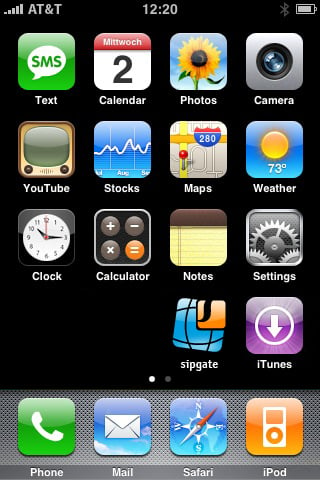
     iPhone, Blackberry, Android, and almost any other smart phone OS, is based on the grid of icons, or apps. Windows Phone 7 is not that.
  
iOS
Android
Blackberry   
Window Phone 7 incorporates the idea of hubs. For example, in the people hub, you get your contacts, and updates from them, and integration with Facebook, all in one "hub". With any other OS, you would have to go through many apps to do what you can do in Windows Phone with one tap.
Windows Phone 7
     Currently, Windows Phone 7 is available in 5 phones. The Samsung Focus, the LG Quantum, the HTC Surround, the HTC HD7, and the Dell Venue Pro. The carriers available are AT&T and T Mobile, but other carriers should come along eventually.
     Microsoft has really made a very nice looking product. Will it be successful? I don't know. I personally think the "hub" thing is a bit too complicated. But only time will tell.  

For more info visit microsoft.com/windowsphone 

    
READ MORE - Windows Phone 7